

We have released a new feature today that solves a few teething issues that marketers and developers often face when sending users and events data from their apps and website to a 3rd party solution like Segment.com, Mixpanel, WebEngage, etc.
At WebEngage, we have routinely come across issues such as data type of a particular attribute of an event not being uniform across different sources such as website, Android app, iOS app, etc. Too often we find that a particular source eg. an Android app has defined Attribute X as Boolean whereas another source eg. the Website has defined the same Attribute X as Number. Which data type is correct? And how do you even go about tracking such integration issues after you have already onboarded? Given that the code base for your apps and website is updated frequently, a developer might inadvertently change the data type of some attribute or even worse, completely stop sending that attribute or that event from that source. Unfortunately, these scenarios happen often.
We’ve been wanting to build a solution to this problem for a really long time. In addition to the customer delight, this feature also brings a lot of joy to our customer success teams who in the past have had to scramble to resolve these issues with customers. With our new release today, you will be able to track in-depth the status of the data about your users and events that you’re sending to us from your website, mobile apps, and REST API. You can also change the data type of attribute in WebEngage and you can also stop tracking certain attributes and events.
Did somebody change the data type of an attribute in your apps or website? We’ll proactively show you which attribute from which source (website, Android app, iOS app, REST API) is the cause of this problem.
Never sent data for an event or an attribute from a particular source to WebEngage? We’ll proactively show you the status of integration of each of the sources for each of your events and attributes.
Accidentally changed your code such that your sources are not sending an event or an attribute to WebEngage anymore? We’ll proactively show you which attributes and events are being successfully tracked and which ones are stale (last received more than 7 days ago).
Want to stop tracking a particular event or a particular attribute that you’re sending to WebEngage? You can now do so from the WebEngage dashboard.
Want to change the data type of an attribute you’re already sending to WebEngage so that in the future, attributes get ingested in the changed data type? Head over to your WebEngage dashboard and make the necessary change to the data type of the attribute.
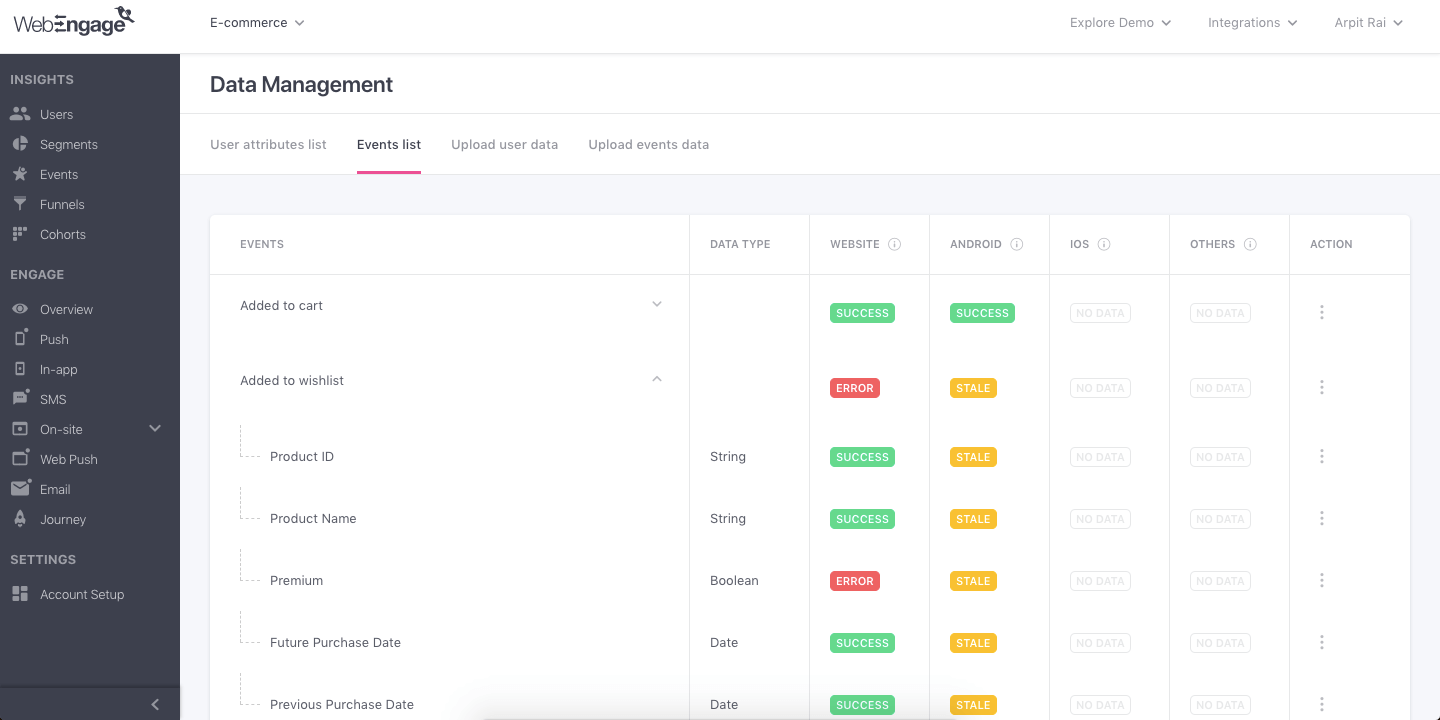
In summary, WebEngage will now proactively inform you in real-time whether there are any issues in the data we receive about your users and events from your apps and website so that you can then take the necessary corrective action quickly. In addition, you will also be able to stop/start tracking events and attributes and also change the data type of attributes.
Try out our new feature and tell us what you think of it! Or request a demo from our Success team to learn more about this feature.